Flex symbol element
The flex symbol element lays out its children in a row or column depending on the chosen main axis. Instead of using top, left, top and bottom, we’ll refer to the sides of the main axis as start and end. The other, orthogonal, axis is called the cross axis.
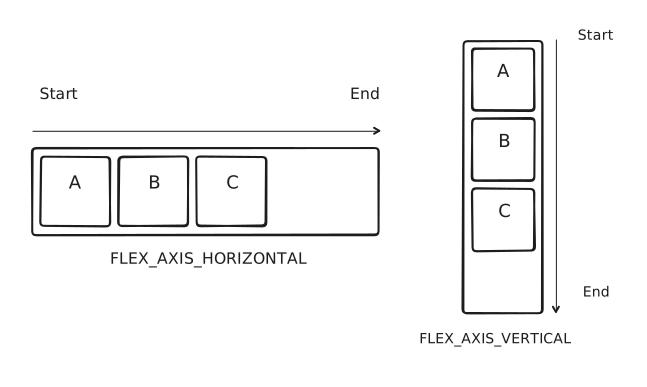
Despite this layout bearing the same name as the flex layout defined by CSS and sharing many similarities, it is not an implementation of its CSS counterpart. Do not assume that it works the same way.
Main axis alignment
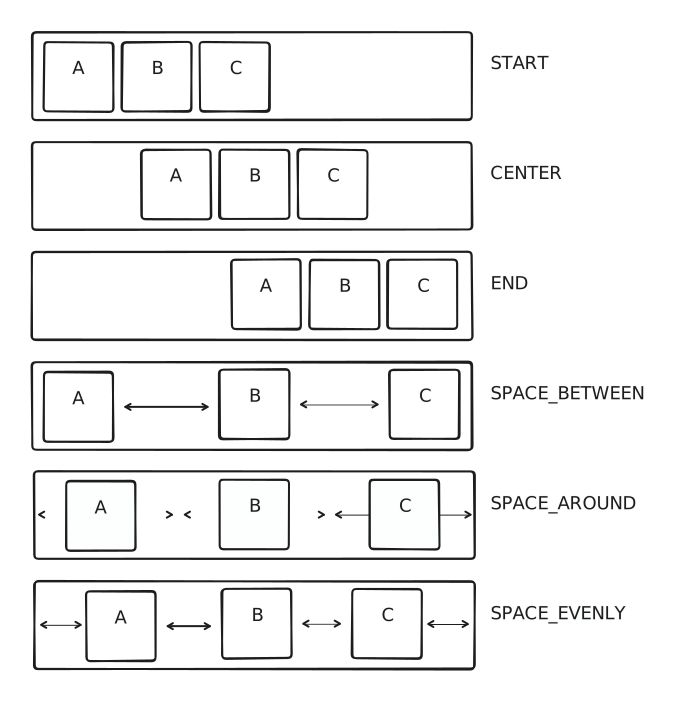
On the main axis, the way children are distributed is controlled by the the main axis alignment. The free space is defined as the space that is left on the main axis after the children have been laid out to reach the minimum size of the container.
START,CENTER, andENDkeep the elements packed together but place them at the corresponding location inside the flex container.SPACE_BETWEENdistributes the free space evenly between each element, but not on the edges.SPACE_AROUNDdistributes the free space as equal padding around each element.SPACE_EVENLYdistributes the free space evenly between each element and on the edges.
Cross axis alignment
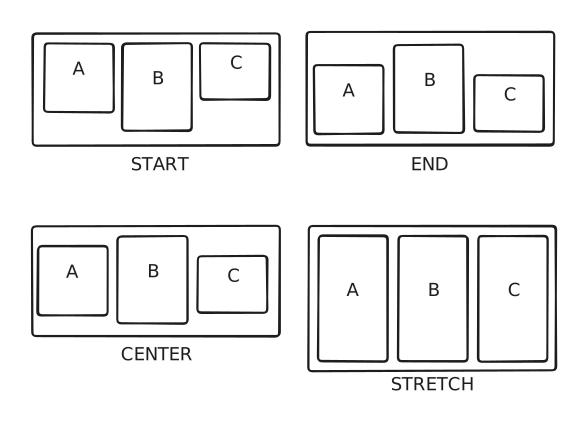
On the cross axis (horizontal when main is vertical, vertical when main is horizontal), children are placed depending on the cross axis alignment.
START,CENTERandENDplaces the children at the corresponding location on the cross axis. The size of the container on this axis is the size of the largest child.STRETCHstretches the size of the children to the maximum size on the cross axis given by the constraints of the flex container’s parent.
Flexible children
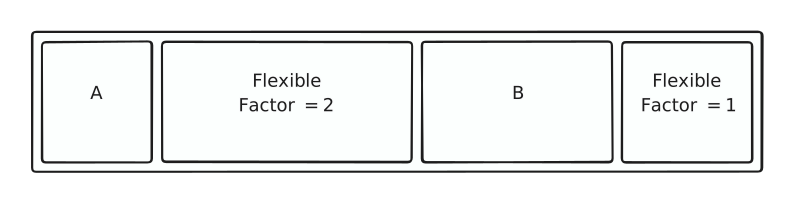
So far we have assumed that children occupy a fixed size on the main axis of the container. However it can be useful to let children get resized to take as much space as possible. To that end, all flexible children of flex containers go through a different layouting process. Note that flexible elements have no effect when they are not direct children of flex containers.
- The flex container first lays out all non-flexible children.
- Then the remaining maximum space is computed using the sum of the non-flexible children sizes and the maximum constraint size on the main axis.
- A portion of this remaining space is then allocated to each flexible children, weighted by their
factor. For instance if there is 300 units remaining and that there are two flexible children, one with a factor of 2 and one with a factor of 1, the first gets 200 units and the second gets 100 units. - The flex container then lays out the flexible children with their allocated size.
There is an additional parameter: flexible children can either have a loose or a tight fit.
- When tight, the child must be exactly the size is it allocated.
- When loose, the child receives constraints between 0 and its allocated size. Any unoccupied space will be distributed using the main axis alignment.