Clipping
Clipping allows hiding parts of the scene defined by half-spaces. A global ID can be assigned to each clipping plane, and this ID can be used by each layer of the scene to be clipped against the corresponding plane.
Defining a clipping plane
A clipping plane layer is defined through its global ID, position and normal. Moreover, users can display an outline around the cut defined by a color and a width.
The number of clipping plane layers is limited to 8, and hence their global IDs range from 0 to 7. This limit has the following consequences:
- Other IDs will make the clipping plane unusable.
- For forward compatibility, it is advised to use negative IDs for unusable clipping planes, so that they won’t interfere with future versions of Horizon that may allow for more clipping planes.
- Using the same valid global ID twice is undefined behaviour.
It is possible to display a plane as a visual representation of the clipping plane. Both the colour of the visual plane and its size are configurable. Its properties are shared across all the scene views.
Clipping a layer
To clip a layer, the user needs to change its clip_id property to choose its active clipping plane. To clip the terrain, the user needs to change the clip_id property in the TerrainSettings (which is part of the SceneViewSettings).
Using an invalid clipping plane ID (outside the range from 0 to 7) will disable clipping. For forward compatibility, it’s advised to use negative IDs to disable clipping.
Using a valid clipping plane ID that is not defined by a clipping plane layer is undefined behaviour.
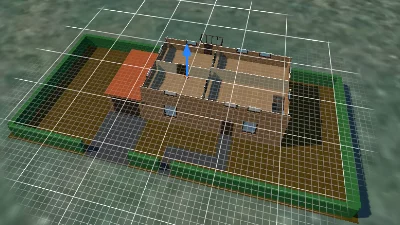
Clipping plane
Go to gallery demo