Stack
Draw order
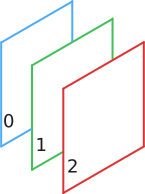
A StackSymbolElement is used to accumulate and render overlapping children elements. The order of the children is important since it determines their render order. The child that appears first in the stack is rendered first (along with its own children) while the child at the end of the stack appears in front of all the others. The numbers in the following illustration shows a spread out view of the render order where 0 is being rendered first and 2 being rendered last.
Children and sizes
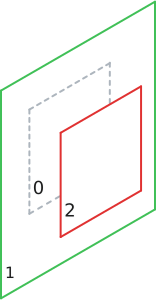
A stack makes a distinction between normal children and expand children. Expand children are children of type StackExpandSymbolElement. All the other children are considered normal. The size of a stack element is determined by the maximum size of all its normal children. On the following illustration the green element, being the largest in the stack, determines the stack size.
Stack expand
A StackExpandSymbolElement is a layout element that only has effect when placed inside a stack element. Using a stack expand inside a stack creates an expand children. The stack layout strategy is different for the expand children. Once the size of the stack is determined, all the expand children of a stack are set to grow up to the size of the stack. This can be really useful to add a background to a symbol for example.
Alignment
A stack lets the user configure how its children should be align relative to the calculated size of the stack. Check out the alignment documentation.